 Beamote
XGIMI remote app for Android
Lost the XGIMI remote? Use your phone.
Beamote turns an Android phone into a remote for XGIMI projectors. It connects over your home Wi-Fi, so it works even if your phone has no infrared blaster.
We built it for our own projector, a China-market XGIMI RS 10 Ultra, because neither the global XGIMI app nor Google's remote would talk to it.
- Free for 7 days, no card
- No ads, no account
- Tested on a real projector
"Is this another scam remote app?"
Search Google Play for "XGIMI remote" and you get a page of apps with almost the same name. The ones we looked at don't say which projector they were tested on or how they connect, and they all show ads. We get why people are suspicious.
Try before you pay
Every feature works for 7 days with no card. If Beamote can't find or control your projector, uninstall it. You've paid nothing.
A real company
Made by PRIVE COMPANY (프리베컴퍼니), a registered business in South Korea, business no. 719-07-03473. Payments go through Google Play.
We say what doesn't work
The model list says which projectors we've tested, which are in beta and which aren't supported yet.
Nothing collected
No ads, no analytics, no login. The app only talks to your projector. There's no server of ours for it to talk to.
More on how to check us, and how to spot remote apps that won't work →
Setting it up
- Turn the projector onUse the power button on the projector. In standby it drops off the network.
- Same Wi-FiConnect your phone to the same Wi-Fi as the projector. Guest networks usually won't work.
- Open BeamoteIt looks for the projector on its own. Tap "Show on screen" and a volume bar pops up on the right projector.
No IP address to type and, on China-market models, no pairing code. If search fails, you can still enter the IP by hand. Connection help
What it does
Clickpad
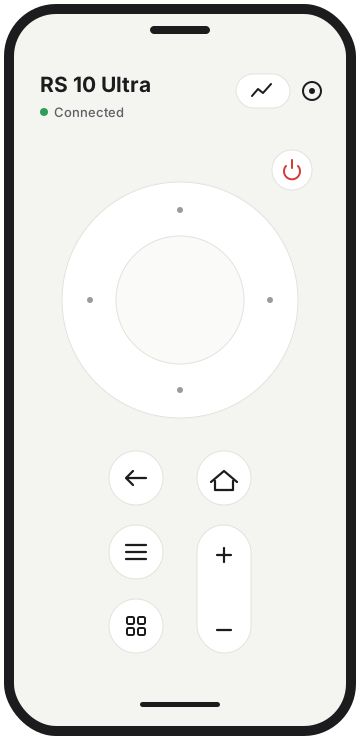
Press the ring for up, down, left, right (hold to repeat). Tap the middle for OK, or swipe on it like a touchpad.
The usual keys
Back, Home, Menu, volume, and your phone's own volume buttons.
Focus and keystone
Focus, autofocus and auto keystone show up when your projector supports them, and stay hidden when it doesn't.
Projector status
Temperature, volume, picture and light mode, inputs, firmware version and uptime.
Power
Supported models can be switched on over Bluetooth. Long-press power to turn off.
More than one projector
Save them all and switch between them. The app is in English, Korean, Chinese and Japanese.
Which XGIMI projectors work?
| Projector | System | Status |
|---|---|---|
| RS 10 Ultra 典藏版 (China market) | GMUI 6.6 | Tested |
| Other China-market models (H, Z, RS series) | GMUI | Should work not confirmed yet |
| Horizon, Halo+, MoGo, Elfin, Aura (global) | Android TV / Google TV | Beta |
| Models with XGIMI OS | XGIMI OS | Not yet |
Details for each model, and free alternatives where they exist: XGIMI models.
Price
First 7 days
FreeEverything works. No card needed.
Monthly
US$0.99Cancel in Google Play whenever you like.
Lifetime
US$4.99Pay once.
Local prices are set by Google Play (₩990 / ₩4,900 in Korea). Google Play handles payment and refunds.
Questions people ask
Is Beamote the official XGIMI app?
No. It's an independent app that works with XGIMI projectors. XGIMI didn't make it and doesn't endorse it.
Is there an official XGIMI remote app?
It depends on the model. Google TV and Android TV models can use Google's own remote (Google TV app, or the remote tile in Android quick settings). China-market GMUI models have a Chinese app that isn't on Google Play, which is the gap Beamote fills.
Do I need an IR blaster?
No. Most XGIMI remotes are Bluetooth, not infrared, so IR remote apps usually can't control them anyway. Beamote uses Wi-Fi.
My XGIMI remote stopped working. What should I try?
Usually batteries or lost pairing. See XGIMI remote not working.
It can't find my projector.
Check that the projector is on (not standby), that both are on the same Wi-Fi, and that VPN is off on the phone. Full checklist.
Is there an iPhone version?
Not yet. Android only for now.